Givable AI
Ask your donor data anything, securely.
An assistant that already knows your data. Ask a question, have the report built, or get a first draft, without a donor’s name ever leaving Givable.
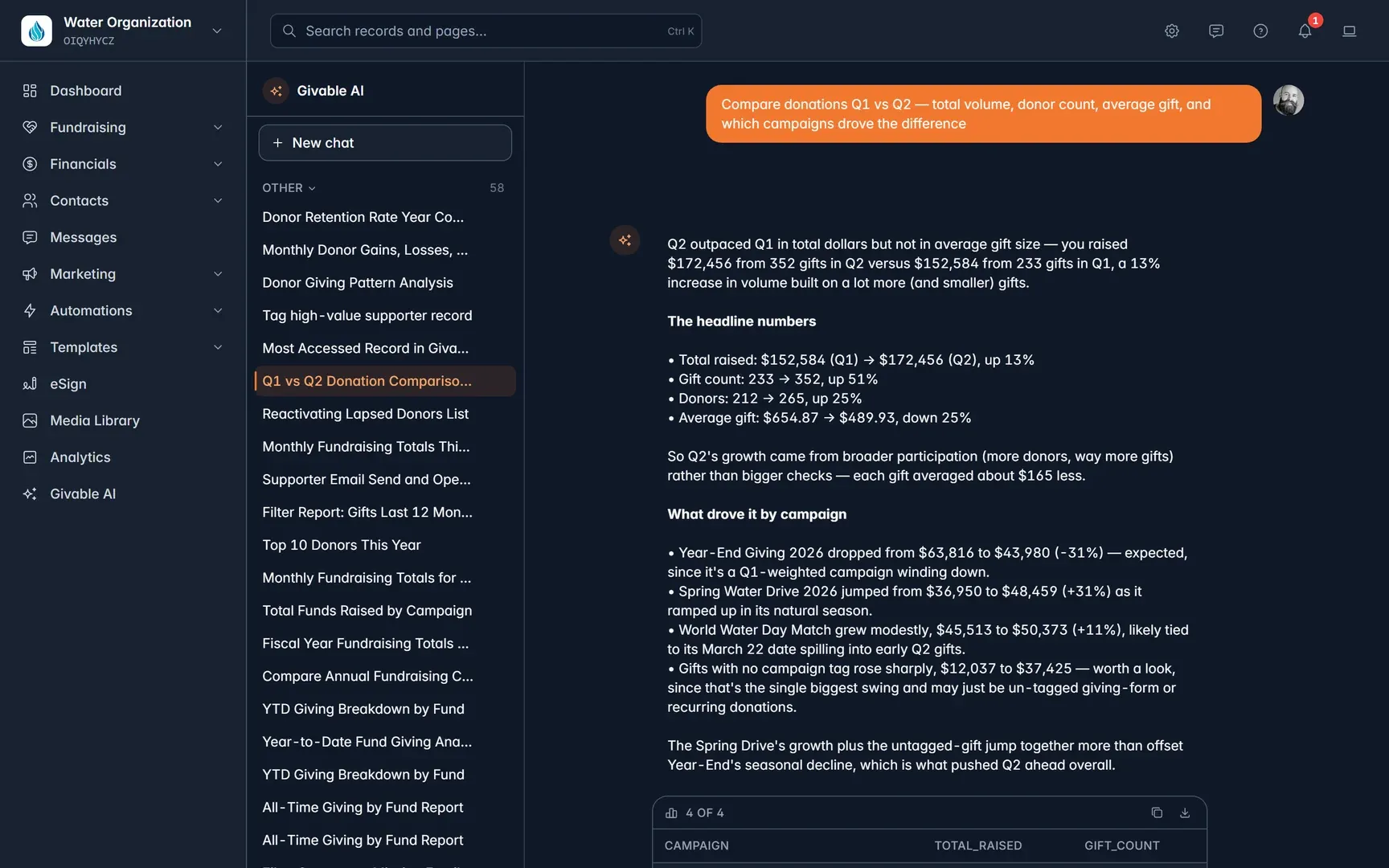
Just ask
Plain-language questions, real answers.
No query builder and nothing to configure. Ask the way you’d ask a colleague.
Answers you can use
Every answer comes ready to act on.
Tables, charts, and totals from your organization’s real data, with the controls to keep them.
- Copy the table or download a CSV.
- Pin a figure to a dashboard to keep an eye on it.
- Pick a record with @, or see what it can make with /.
Answers about your data
Supporters, gifts, campaigns, and funds, with tables and charts to copy, download, or pin to a dashboard.
Things built for you
Forms, pages, events, lists, reports, dashboards, and journeys. They arrive switched off, so you review them first.
Drafts
Emails, replies, and flows. It writes, you edit, and you send.
Help with Givable
How a feature works, or how to write the formula you need.
Drafts where you work
It knows what you have open.
Open the side panel beside any record, list, report, or editor. Ask “make this friendlier” and it knows what “this” is.
- Suggestions land in your unsaved copy.
- Nothing is saved until you save it.
- Or open the full page, with your chat history.
Open it anywhere withCtrl+J
Private by design
Your donors stay behind.
Your donors didn’t sign up to be typed into an AI assistant, so they aren’t. Names, email addresses, phone numbers, and addresses are swapped for placeholders before anything leaves Givable, and put back only on your screen.
- Card and bank details, passwords, and keys are never sent.
- Two independent checks catch personal details.
- Conversations are private to the person who had them.
Never sends or publishes
Not an email, not a text, not a document for signature.
Never deletes
It has no way to delete anything in your account.
Changes only with approval
Only the changes your organization enables, shown exactly before they happen.
Works under your permissions
It sees what you can see, and nothing more.
Your organization decides
AI on your terms.
Administrators choose who can use it, what it can do, how long conversations are kept, and how much it can spend, and can switch the whole feature off in one place.
Teach it your organization’s words, and see usage by model and by person each month.
Givable AI questions
Does Givable AI send donor names to the AI model?
No. Names, email addresses, phone numbers, and addresses are replaced with placeholders before anything leaves Givable, and the real values are put back only on your screen. Card and bank details, passwords, and files you have not asked about are never sent at all.
Can it see data I don’t have access to?
No. Givable AI runs as you, under your permissions and record visibility rules. Two people asking the same question can get different answers, and conversations are private to the person who had them.
Can it send emails or change records on its own?
It never sends or publishes anything and cannot delete anything. It changes a record only when your organization has turned that capability on and the person at the keyboard approves the exact change.
What can administrators control?
Whether the assistant is available, which models and capabilities are on, proactive insights, how long conversations are kept, a monthly credit cap, and instructions and a glossary so it uses your organization’s words. The whole feature can be turned off in one switch.